Clicking the button does nothing
The button needs the plugin’s small script to run. Common causes:
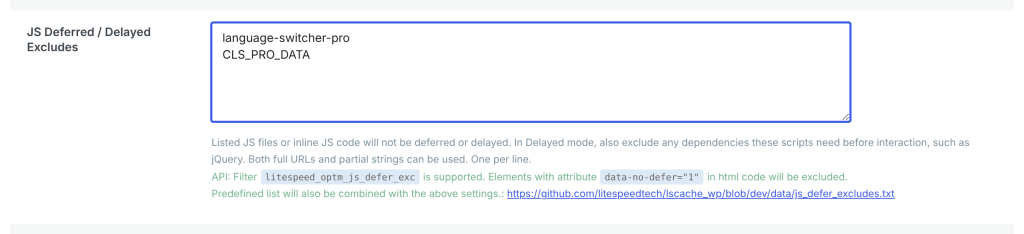
“Delay JavaScript” or “Load JS on interaction” options in WP Rocket, LiteSpeed Cache, Perfmatters, FlyingPress, Autoptimize and similar plugins. They hold scripts until the visitor scrolls or moves the mouse. Exclude the plugin from delay: add language-switcher-pro (the plugin folder) and CLS_PRO_DATA (its settings) to the exclusion list.
Combined or minified JavaScript. If your optimization plugin combines scripts, exclude language-switcher-pro/assets/js/cls-pro.min.js from combining.
A JavaScript error from another plugin or your theme. An error elsewhere can stop all scripts. Open your browser’s console (F12 → Console) and reload. If you see red errors, temporarily turn off other plugins to find the cause.