Suggesting a language by browser
- Go to Settings → Language Switcher → Detection.
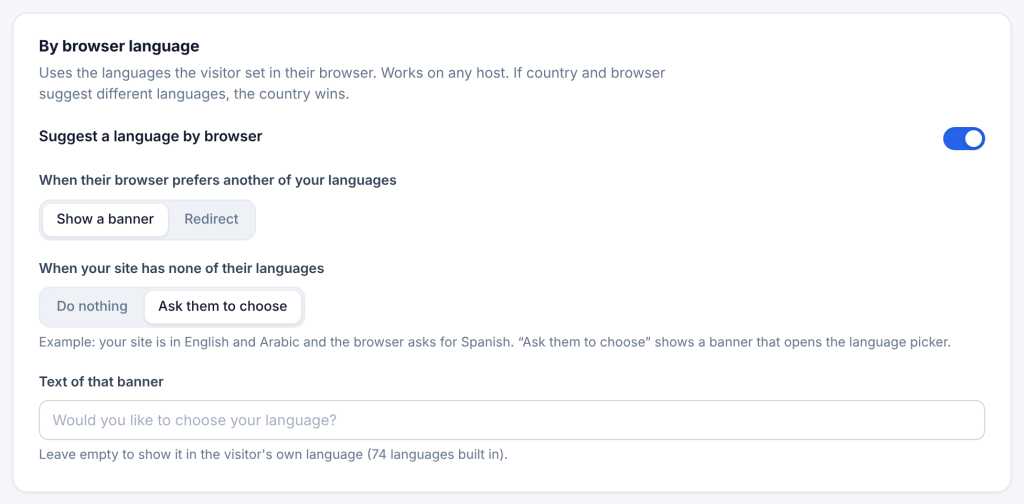
- In the By browser language card, switch on Suggest a language by browser.
- Under When their browser prefers another of your languages, choose Show a banner or Redirect.
- Save.
How the match works. Browsers list languages in order of preference, for example German, English. The plugin walks that list and stops at the first language your site has:
- If that language is the one on the page, nothing happens. A visitor whose browser says English, then German on your English page is not bothered.
- If it is a different language, that language is offered.
Regional codes match their base language: a browser set to de-AT matches German if you do not have German (Austria). Other codes for the same language are understood, such as nb for Norwegian.
When your site has none of their languages. Example: your site is in English and Arabic, and the browser asks for Spanish.
- Do nothing (default): no banner.
- Ask them to choose: a banner in the visitor’s own language (Spanish here) invites them to pick a language. Its button opens the language window.
The “choose your language” banner text is built in for 74 languages. To use your own text, type it in Text of that banner; it is then shown as typed to everyone.