Changing a language’s flag
Every language has a usual flag (Spanish shows Spain, Arabic shows Saudi Arabia, English shows the United States). To change one:
- On the Languages tab, find the language.
- In the small box on the right of its card, type a two-letter country code, for example
mxfor Mexico. Suggestions appear as you type. - Click Save changes.
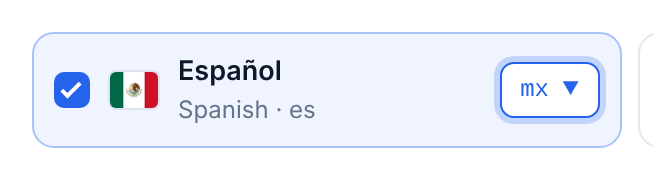
The new flag is used everywhere: the button, the language window, the dropdown, the grid and the suggestion banner. To go back to the usual flag, empty the box and save.
Popular changes:
| Language | Code | Usual flag | Common change |
|---|---|---|---|
| Arabic | ar |
Saudi Arabia (sa) |
Egypt eg, UAE ae, Jordan jo |
| English (US) | en |
United States (us) |
United Kingdom gb, Canada ca, Australia au |
| Spanish | es |
Spain (es) |
Mexico mx, Argentina ar, Colombia co |
| Portuguese | pt |
Portugal (pt) |
Brazil br |
| French | fr |
France (fr) |
Canada ca, Belgium be, Switzerland ch |
| German | de |
Germany (de) |
Austria at, Switzerland ch |
| Chinese (Simplified) | zh |
China (cn) |
Singapore sg |
Which codes work? The two-letter country codes of the 250 countries and territories in the plugin (ISO 3166-1), plus US states as us- and the state code, for example us-ca for California. A code the plugin has no flag for is not saved: the save message tells you a value was corrected, and the box is emptied.
Languages without a country of their own use the flag most people link with them, for example Catalan, Basque and Galician show Spain, and Welsh and Scots Gaelic show the United Kingdom. Change them the same way if you prefer another flag.