Using Language Switcher Pro with a translation plugin
Language Switcher Pro replaces your translation plugin’s switcher with its own button and window, while your translation plugin keeps doing the translating. There is nothing to connect: the plugin detects which one is active.
You can see what was detected in two places:
- The chip in the top bar of the settings screen (for example WPML), and the green WPML detected message on the Languages tab.
- The URLs tile on the Languages tab.
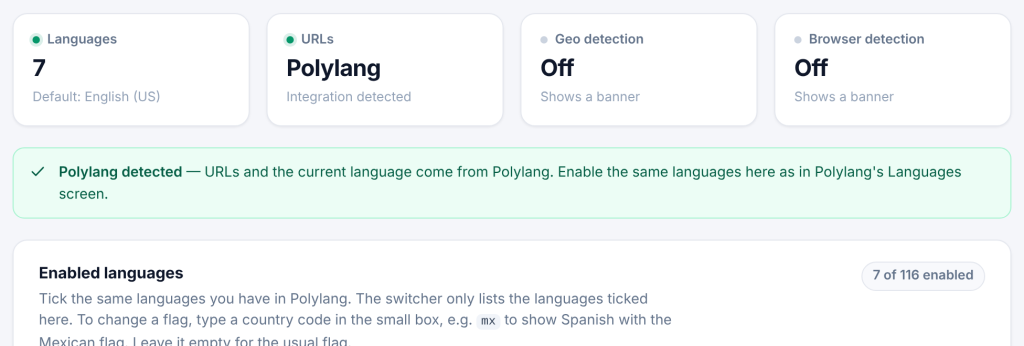
What comes from your translation plugin: the current language of each page, and the link to the same page in every other language (with translated slugs where the plugin supports them).
What you still set in Language Switcher Pro: which languages appear in the switcher, and everything about how it looks and behaves.
Language names are never machine-translated. The switcher button, the language window, the grid, the dropdown and the suggestion banner are marked translate="no", so plugins that translate the whole page (Linguise, TranslateWP, Weglot, GTranslate) leave “Deutsch” as Deutsch instead of turning it into “Allemand” on the French page.
Setup checklist for every translation plugin:
- Tick the same languages on the Languages tab as in your translation plugin.
- Choose the same default language.
- Add the switcher (menu, block or shortcode) and, if you like, remove your translation plugin’s own switcher so there is only one.
- Leave hreflang to your translation plugin. Language Switcher Pro does not add its own hreflang links when a translation plugin is active.
Language codes are matched for you. Translation plugins use their own codes and locales (pt-br, pt_BR, zh-hans, nb…). The plugin maps them to its own codes, so Portuguese (Brazil) in WPML is Portuguese (Brazil) in the switcher. If your translation plugin has only the main language (Portuguese) while you enabled a regional one here (Portuguese (Brazil)), they are matched too, as long as only one regional version is enabled. A custom language you created in your translation plugin that is not among the 116 languages cannot be shown.
If two translation plugins are active, the first one found is used, in this order: WPML, Polylang, TranslatePress, qTranslate-XT, Weglot, MultilingualPress, GTranslate, Bogo, WP Multilang, TranslateWP, Linguise.