Suggesting a language by country
- Go to Settings → Language Switcher → Detection.
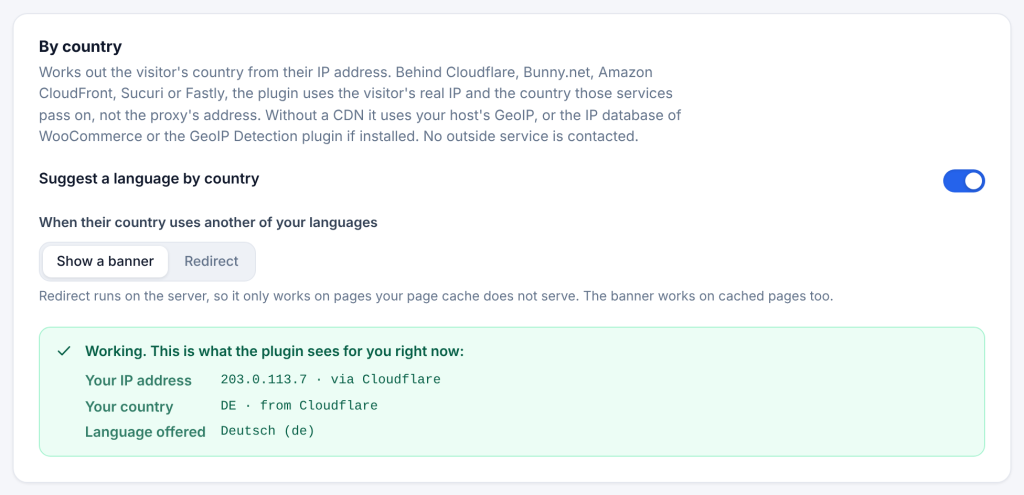
- In the By country card, switch on Suggest a language by country.
- Under When their country uses another of your languages, choose Show a banner or Redirect.
- Save.
- Look at the status box under the setting. It shows what the plugin sees for your own visit right now: your IP address, how it was found, your country and where it came from, and the language your country is offered.
If the box says No country found for your visit right now, your site cannot see countries yet. See Setting up country detection on your CDN or host.
How the country is found, in order:
- Your CDN’s country header: Cloudflare, Bunny.net or Amazon CloudFront.
- Your web server or host: a GeoIP module in Apache or nginx, or a host feature such as WP Engine GeoTarget.
- An IP database already on your site: the GeoIP Detection plugin, or WooCommerce’s MaxMind database.
No outside service is ever contacted, and nothing about your visitors leaves your site.
Real visitor IP behind proxies. Behind Cloudflare, Bunny.net, Amazon CloudFront, Sucuri or Fastly, your server normally sees the proxy’s address. The plugin reads the visitor’s real IP from the header that service adds, and only trusts that header when the service’s own marker header is there too. Behind your own load balancer, it reads X-Forwarded-For only when the request comes from a private network address.