w Docs

Using the switcher in page builders

1 min readUpdated November 9, 2026

Most page builders have a Shortcode element (Elementor: Shortcode widget, Bricks: Shortcode element, Divi: Code module, Beaver Builder: HTML module). Add one to your header and type:

Add attributes to choose a style, for example .
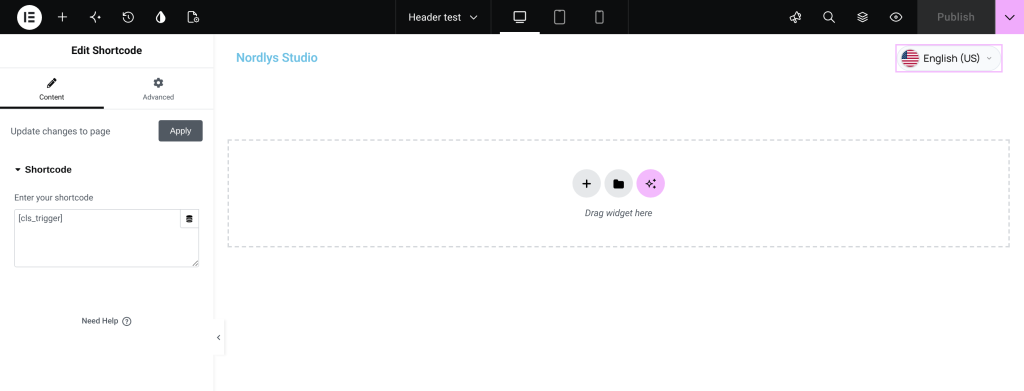
Elementor editor with a Shortcode widget containing <button type="button" class="cls-trigger cls-trigger--pill" data-cls-trigger="modal" translate="no" aria-haspopup="dialog" aria-expanded="false" aria-label="Change language" title="English (US)"><span class="cls-flag-wrap cls-flag--circle" style="width:20px;height:20px;min-width:20px;min-height:20px;display:inline-flex;flex-shrink:0;border-radius:50%;overflow:hidden;position:relative;vertical-align:middle" aria-hidden="true"><img src="https://www.wplanguageswitcher.com/wp-content/plugins/language-switcher-pro/assets/flags/128/us.png" srcset="https://www.wplanguageswitcher.com/wp-content/plugins/language-switcher-pro/assets/flags/40/us.png 40w, https://www.wplanguageswitcher.com/wp-content/plugins/language-switcher-pro/assets/flags/64/us.png 64w, https://www.wplanguageswitcher.com/wp-content/plugins/language-switcher-pro/assets/flags/128/us.png 128w" sizes="39px" alt="" loading="eager" decoding="async" style="position:absolute!important;inset:0!important;top:0!important;left:0!important;right:0!important;bottom:0!important;width:100%!important;height:100%!important;max-width:none!important;max-height:none!important;object-fit:cover!important;object-position:center!important;display:block!important;border-radius:0!important;margin:0!important;padding:0!important;border:none!important"></span><span class="cls-trigger__label">English (US)</span><svg class="cls-trigger__chevron" xmlns="http://www.w3.org/2000/svg" width="10" height="10" viewBox="0 0 24 24" fill="none" stroke="currentColor" stroke-width="2.5" stroke-linecap="round" stroke-linejoin="round" aria-hidden="true"><polyline points="6 9 12 15 18 9"/></svg></button> and the switcher button showing in the header

Menus built by a page builder. If your builder’s menu element uses a WordPress menu (Appearance β†’ Menus), the Language Switcher menu item works there too. The plugin outputs the menu item as a plain button with no link around it and handles clicks before the builder does, so it works with Bricks and most builders. If the builder draws its own menu without WordPress menus, use the shortcode instead.