Everything it does, in one place
Every feature is in the one $49.99 plan, on every site you build. Here's the full list, grouped the way you'll find it in the settings.
A button, a window, and a grid
Put the button in your menu, a block, a shortcode or PHP. It opens a language window your visitors can search, and it works with a keyboard and a screen reader.
Ways to add the switcher → Français
 ZH
 Español
 日本語Japanese
 Pill · Minimal · Classic · Card · Icon only
- 5 button styles
Pill, Minimal, Classic, Card and Icon only.
- A different style on phones
Up to a width you choose (768 px by default), per site, menu item, block or shortcode.
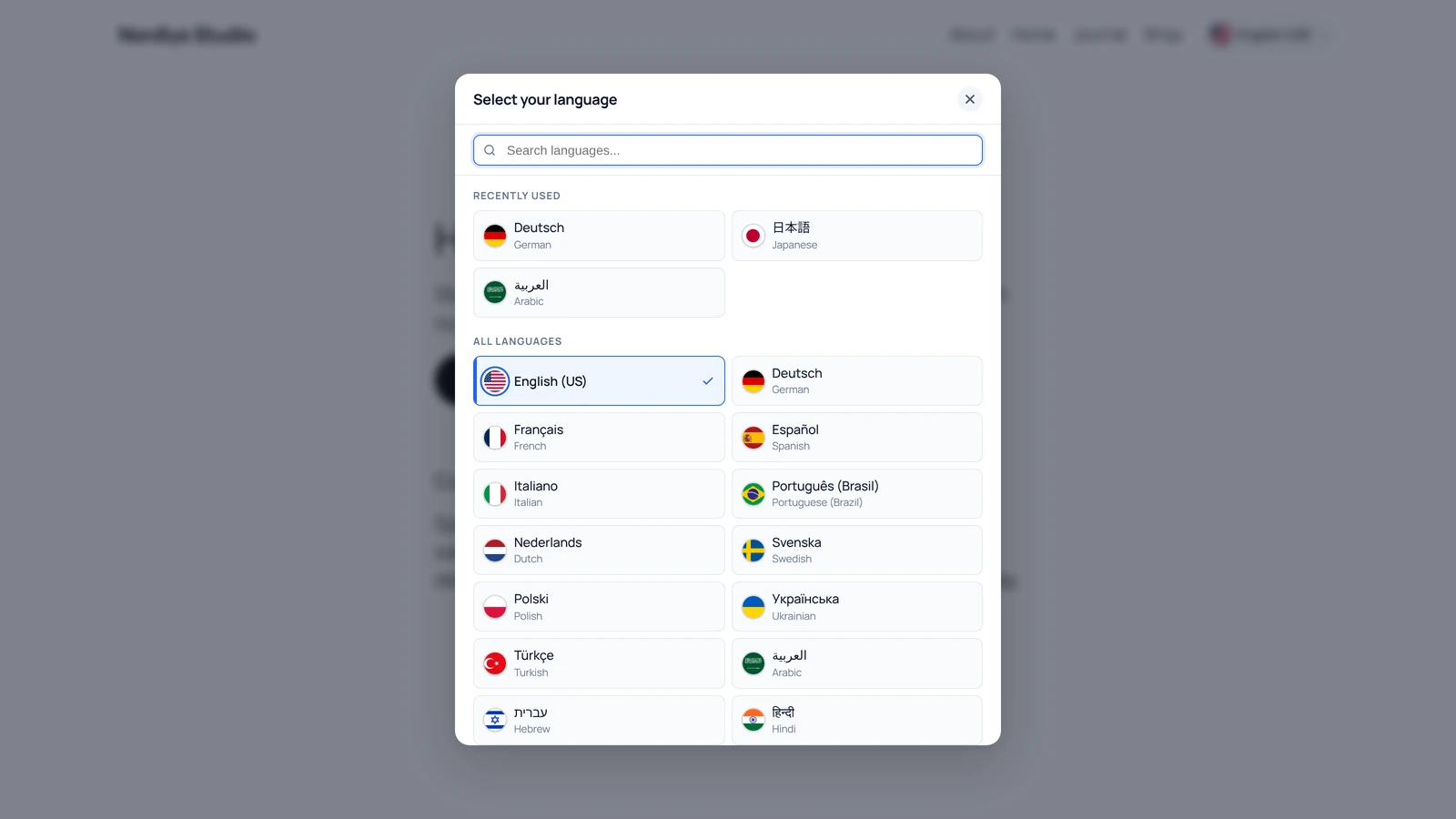
- Language window
Heading, search, “Recently used”, a check mark on the current language and a close button.
- Dropdown mode
A short list under the button instead of the window.
- Language grid
Every language right on the page, as a block, shortcode or PHP.
- Any #cls-modal link opens it
Classic menus, the Navigation block in block themes, buttons and content.
- Fully accessible
Focus trap, arrow keys, Escape, focus return and ARIA throughout.
- Respects reduced motion
Animations turn off for visitors who ask their device for less motion.
- Works with page builders
The menu item is a plain button that works with Bricks and most builders.
116 languages, each written its own way
Every language shows in its own script, with the English name underneath. The flags are stored on your site, and right-to-left languages are laid out properly everywhere.
Languages and flags in the docs → DeutschGermanالعربيةArabic
 EspañolSpanish
 हिन्दीHindi
 עבריתHebrew
 한국어Korean
↑ Spanish with the Mexican flag: any language can use any flag.
 Circle
Rounded
Square
- 116 languages
Each with its own name and its English name. Other codes are understood too (nb, iw, zh-hans, pt-pt).
- 250+ flags on your own site
Countries, territories and US states, in 3 sizes, sharp on every screen.
- Custom flag per language
Spanish with the Mexican flag, English with the British one. Your call.
- 3 flag shapes
Circle, rounded or square, with separate sizes for the button and the window.
- Right-to-left done properly
Arabic, Hebrew, Persian and Urdu in the button, window, grid, dropdown and banners.
- Window heading in 75 languages
Change it per language, or use one heading for all. Window texts in 43 languages.
Offer each visitor their language before they look for it
By country, by browser language, or both. Show a banner written in the suggested language, or redirect. Everything happens on your own server, with no outside service.
How language detection works →
Möchten Sie diese Website auf Deutsch ansehen?
DeutschNein danke
A visitor in Germany on your English page. The banner is written in German.
- 1Your CDN or proxy: Cloudflare, Bunny.net, Amazon CloudFront, Sucuri, Fastly
- 2Your host's GeoIP: Apache or nginx GeoIP, WP Engine GeoTarget
- 3An IP database already on your site: WooCommerce MaxMind or GeoIP Detection
- By country, from the real IP
Even behind a CDN or proxy, where WordPress only sees the proxy's address.
- Country → language map
Built in for 144 countries. Change it per language, with one click to add the defaults.
- By browser language
Matches the first of the visitor's languages that your site has. Works on its own or after country.
- Banner or redirect
Choose separately for country and browser language.
- Banner in the visitor's language
48 languages built in, or write your own text.
- “Choose your language” banner
When your site has none of their languages, ask in their own (74 built in).
- Works on cached pages
Each suggestion is fetched per visitor, so page caches and CDNs stay correct.
- Safe for search engines
Bots, social previews, SEO tools and logged-in editors are never redirected or shown banners.
- Remembers the choice
One cookie, so nobody is asked twice. You can see your own IP and country in the settings to check the setup.
38 colors, light and dark, or let AI pick them
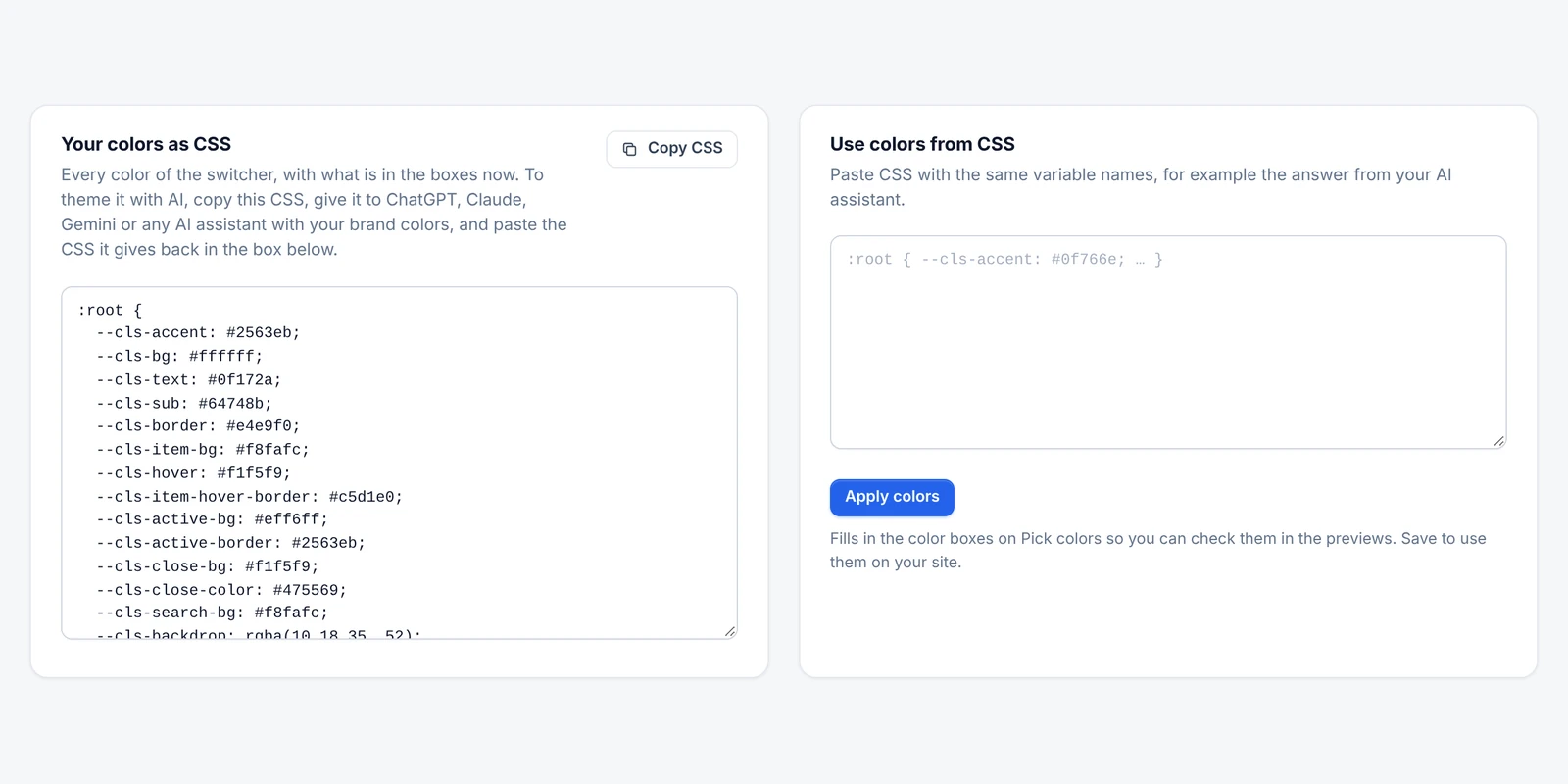
Every part of the switcher has its own colors and a live preview. Copy them as CSS, ask any AI assistant to match your brand, and paste the answer back.
Theming with CSS or AI →Français Italiano
 TürkçeFrançaisItalianoTürkçe
- Every color can be changed
Main color, button and hover, window, cards, current language, close button, search box, overlay and banner.
- A separate dark-mode set
Light, dark, or automatic to follow the visitor's device.
- Theme it with CSS or AI
Copy every color as CSS, get your brand version from any AI assistant, paste it back.
- Your theme's own variables
Colors and font sizes take any CSS value, var(--token) or Automatic.css __var__().
- Names the way you want
In their own language, in English, or both. Columns: auto, 2, 3 or 4. Compact cards.
- 4 opening animations and Custom CSS
Slide up, fade, zoom or none, plus a box for any CSS of your own.
Works with the translation plugin you have. Or none.
It finds your translation plugin on its own and links to each page's real translation, with translated addresses where the plugin has them. No plugin? It gives each language its own address.
How each integration works →- WPML
- Polylang
- TranslatePress
- Weglot
- GTranslate
- Linguise
- qTranslate-XT
- MultilingualPress
- Bogo
- WP Multilang
- TranslateWP
- 11 translation plugins detected
No settings to fill in. If several are active, the plugin picks the right one.
- Names never get translated
Language names are marked so Linguise, Weglot, GTranslate and TranslateWP leave them alone.
- Built-in addresses and hreflang
Default language at /, the others at /de/, /fr/ and so on, with hreflang and x-default.
See which languages people actually want
Every switch, suggestion and redirect can be recorded in Nahnu Analytics. Google Analytics 4 and Tag Manager get an event too, and any other tool can listen to a browser event.
- Google Analytics 4 / Tag Manager
One event with from_language and to_language. You choose its name.
- For any other tool
A cls_language_switched browser event with the old and new language.
| Event | Sent when |
|---|---|
| Language switched | A visitor picks another language (from the window, dropdown, grid, banner or a link) |
| Language suggested | A suggestion banner appears, and why (country or browser) |
| Suggestion closed | The visitor closes a banner |
| Picker opened | The visitor accepts the “choose your language” banner |
| Language redirect | A visitor is redirected to their language |
Small, fast, and nothing leaves your site
- “Recently used” stays in the browser
It's never sent to your server.
- No flash of the wrong style
The phone and desktop buttons swap with CSS alone, before any JavaScript runs.
- Clean uninstall
Settings, menu styles, license data and caches are removed, and the license is freed.
An API for everything it does
Ask for any page's address in any language from PHP, JavaScript or REST. Change languages, flags, the country map and the text with filters.
Read the developer docs →{
"code": "ar",
"label": "العربية",
"label_en": "Arabic",
"url": "https://example.com/ar/about/",
"rtl": true
}A settings screen you'll actually enjoy
Tabs switch instantly and saving needs no page reload. Live previews show every change, and settings that depend on another one are dimmed with a hint.
A tour of the settings screen →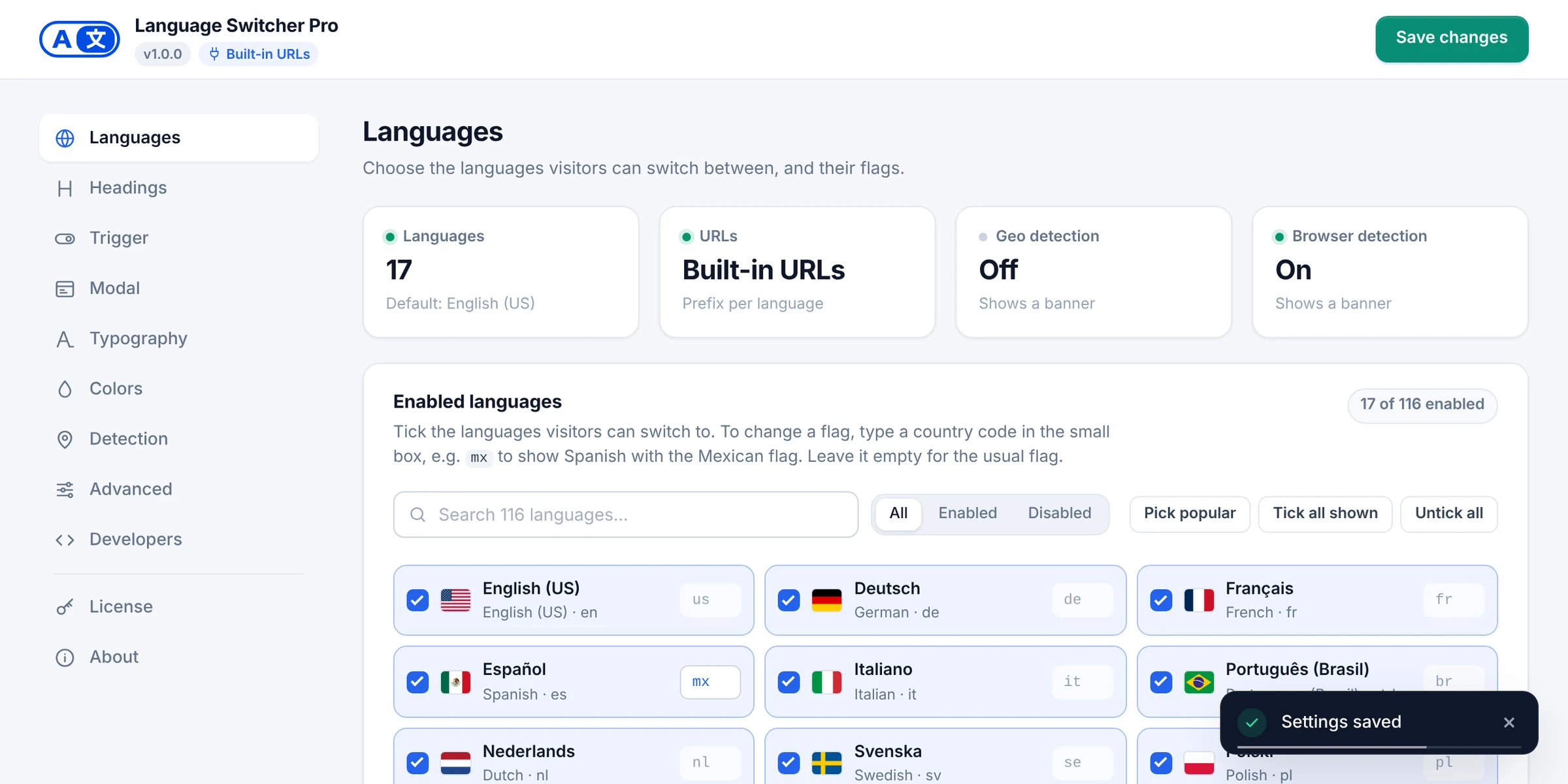
- Saves without reloading
With a toast, a warning if you leave unsaved changes, and Ctrl/Cmd+S.
- Works on any screen
Phones, tablets and wide screens.
- License and updates
Activate with one key and get updates in Dashboard → Updates like any other plugin.
- Pick popular languages
Turn on the 20 most used languages in one click, or search all 116.
- Copy-ready snippets
The Developers tab has every shortcode, block name, PHP call and endpoint ready to copy.
- System info for support
One click copies everything support needs, with no keys or passwords.
All of this, on every site, for $49.99 once.
Unlimited sites, lifetime updates and 1 year of support. 14-day money-back guarantee.
